Network & Infrastructure
Canary to cloud: Building a flexible traffic strategy


Oscar Moreno Garza, Noah Crouch
Uber · Cloudflare
0:02Hello, everyone. I'm Christian Elmerhout. I work as the engineering manager for the DNS team here at Cloudflare. I've been at Cloudflare for the past eight years, and it's been a fun ride so far. My team is responsible for the authoritative DNS platform, the public resolver 1 .1. But today I'm here to talk about how you can build better multi - multi-cloud resilience and it all starts with DNS.
0:36So what would you use something like multi-cloud? One of the main reasons, and it's been increasing over the past few years, is that you have some regulatory demand stating that you can't have a single point of failure for your cloud. And that means you need to turn to multi-cloud. It might also be that you just want to reduce the blast radius of any single vendor outage, and that's a very valid point, but it also comes with a cost. Thirdly, you might strive for vendor neutrality, essentially keeping yourself and your vendors honest so you don't build yourself into a single vendor hyperscaler lock. And that also aids you in two other things. That is, uh...
1:24you leverage when you're trying to negotiate the price but also lets you pick the best of the breed of all the different segments. So the problem is oftentimes that you have two clouds then but one is broken. The problem also comes down to the fact that you have a failover job that relies on being able to access controls that rely on your cloud A provider. So imagine you have a shop. It runs in cloud A. You have a second copy in cloud B. They're both tested. Cloud A has a regional outage.
2:10Things go down, but you can't do the failover. Stuff is still out. So I'm going to look at five different ways to set up this. can try to avoid this and avoid some of the mistakes i've seen happening out there
2:28this is going to have mostly a cdn focus but we're going to start in another part of this first before you pick one of these setups then you actually need to make your requirements list if you haven't got that that down then you're up for uh for failure essentially but you need to decide what has to work
2:58if you're if you have a shop online shop that needs to be the checkout most likely i mean frequently we hear your outage cost us x amount of money i mean that's not uncommon so checkout should likely work Recommendations, maybe not needed. How fast do you need the failover to work? Because let's be frank, there is no such thing as a potential for zero downtime failover.
3:31How much data can you lose? If you're moving from one cloud to another, and if the order now is only on one of the clouds, is that lost to the customer if it is now getting routed to cloud B? and what are you protecting against at the end of the day. So you pick the smallest setup that passes your test for what is the required failover. But a tiny DNS thing first. A lot of these setups that I'm going to talk about uses DNS as a steering mechanism at some point or another. And there is one thing that often gets overlooked when it comes to doing the failover.
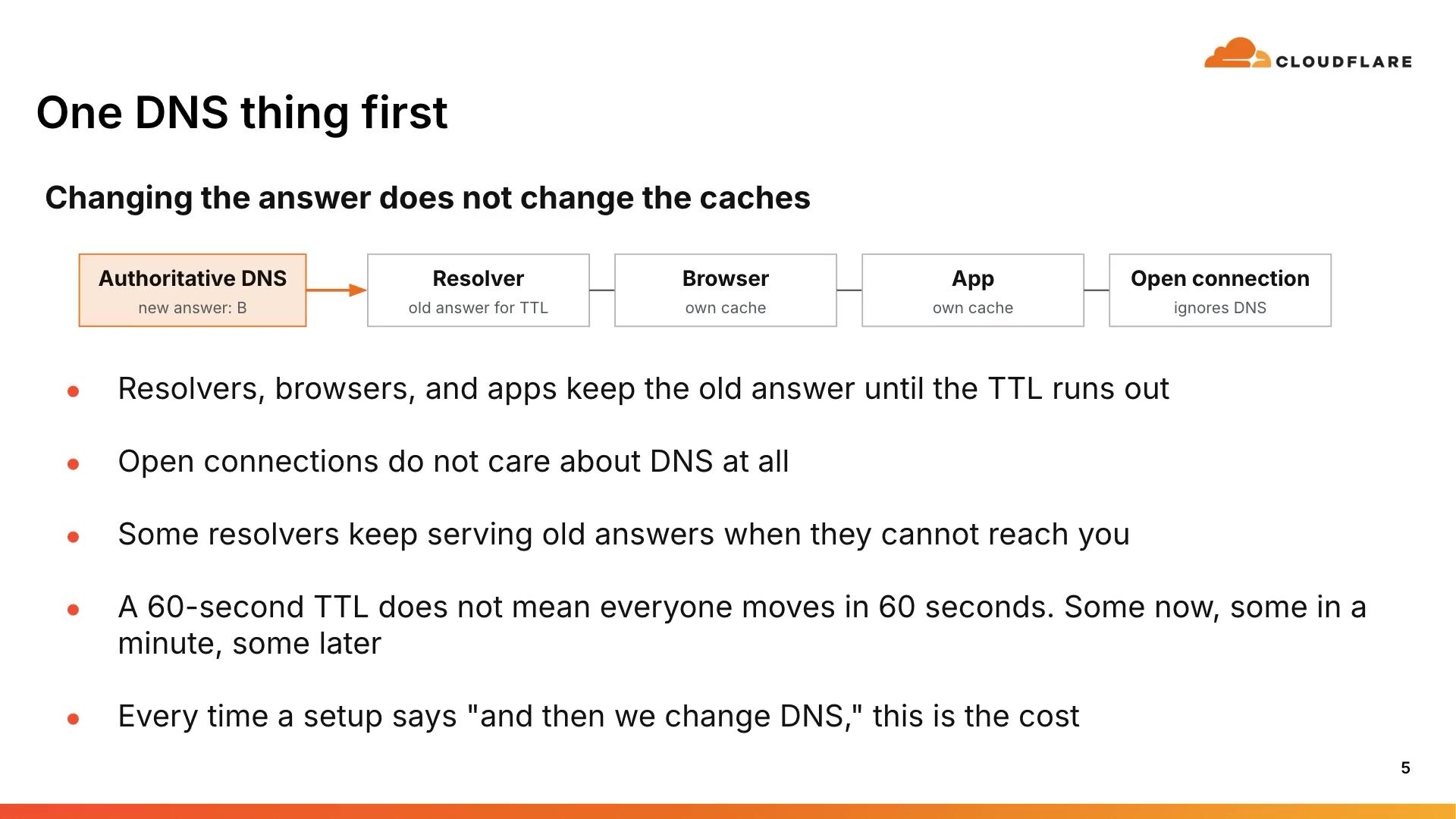
4:19And that is the TTL or the time to live of the DNS records. If you've missed actually keeping track of what that says, then you might have the whole failover time wrong. The TTL is not a law. It's a hint. to resolvers. applications out there how long they can actually keep the records the record that they queried about and reuse that one before they have to query again and get a potentially an updated record so if the TTL says 60 seconds then if you're lucky some clients will start to will query it again and start using the new record that points to the failover cloud but some will take up to the full minute and even then you will have some that that takes even longer and the reason again this is a hint there are ISPs that sets the resolver to only accept a certain amount of minimum TTL to protect their caches in the resolvers and also open connections they don't use the TTO
5:45so let's have a look at the first one which is the many vendor one and to be honest most companies are in this situation you have a different vendor at each point in this you have a different dns different cdn different cloud a cloud b and you're application runs in cloud A. Now the good thing is that nothing is tied to a single vendor.
6:12So if you're in this setup you don't have to do anything but you're also having a failed runbook that essentially has the failover running over a couple of logins and you need to check for different TTLs and credentials every step and you might have a drift config. but one more thing and that matters in your daily job when you debug something you have to chase each point down and most of the vendors might say i only care about this one little area and then you need to track down the full chain of of things and that's a hidden cost that you might not think think about
7:01So let's go with the one that most people pick then. One vendor for everything but the other cloud. Think of this. This might be, I mean, my favorite vendor, which is of course CloudFair. But I mean, very commonly Azure or Amazon as well for these different portions. The good thing, you have a single pane of glass. of the time you have one login and you can pre -configure failover that runs in the data plane so you don't have to do anything when things go wrong at 2am in the morning
7:41and it's often cheap to run for a regional failure the problem though everything is now in a single failure domain the second cloud is behind the door of the one. And if you have missed to configure something, if you need to do a failover, you're now effectively behind the other provider's API. So you go with two CDNs.
8:16And here DNS picks the CDN that it sends the traffic to. And this is what we at Cloudflare called the gray mode. You have different setups, so the name service return either CDN1 or CDN2 or both of them together in a mix. This survives the CDN outage.
8:42You have a potential performance and price leverage because you can pitch the two vendors against each other and say, give me a better price and I'll send more traffic to you. a better performance because that's when we'll send more traffic to you but each and also each CDN steers origins per request so they can independently steer to each of the different clouds that you have now picking a CDN is a DNS sensor so the TTL applies if one of the CDNs goes down You also need to have the same certs, cache, origin out on both of the providers.
9:32And I don't know if, hands up, was there anyone who saw Alex Cox talk yesterday on using Intense and Test to configure CDN? That one ties very neatly into that. As you, if you had been there, you would have seen that each... cloud CDM provider has different defaults for various things and that means it might not be as easy as doing a one-to-one configuration in between the two CDMs. And one more thing, DNS that picks where to send traffic is now a single point of failure. So doing a set of three on Cloudflare, how do we...
10:17the picking. Typically, if we are one of the two CDNs, which I think you should, of course, we normally don't use the Cloudflare load balancer, which is a global software load balancer, GSLB.
10:41But rather, we pick based upon a name, a host name that points either to then the Cloudflare platform CDN or your other CDN provider. There is a slight quirk there in that you can't use the name for the apex of a domain that is the first level for example .com, but you have to use an A record. But we have a technique at Cloudflare and so does others that essentially flattened that on the fly to to work out to a record
11:27if you should go with something like this though where you put us in front of evercloud it's a kind of a evolution of the second uh second setup
11:47here you have dns pointing to our platform using anycast dns what we call an orange record we proxy traffic through the cdm platform to each of the clouds we do orange and failover without changing dns you don't have to do anything this is a 2am you get to sleep tight throughout the night um but of course the problem is you now depend on us fortunately we see we see ourselves as critic of infrastructure so we'll do our best of course to never go down but 2025 was not the best of years in terms of hyperscale incidents i mean all of the big ones including us had incidents that that hurt
12:41So, and one more thing is that this does not remove the detection time or the time for your app to recover. We still have to detect that your application is down on cloud B or cloud A before we can actually steer that. So it all depends upon how often we can do the health checks.
13:06And this is where we leverage our GSLB to monitor your origins in the two CDN setups. The health checks that you configure there, they need to be actually as exhaustive as you need for your application to work. This is where the requirements list matters. what do you require for your application to work does it require a database then the health checks needs to exercise and make sure that it can connect to a database and do its work do you need to have some other checkout system you need to connect to your payment provider well that should be part of the health check as well if it isn't then how can you actually know that you can fail over to or steer traffic to one of the two platforms.
14:09The good part is that now we sit in front of your infrastructure. We hide the origins from the internet. And ideally, you can use tunnels or authenticated origin pools and lock down so that it's only us that gets to access your origins. clouds. That makes it very easy to protect against DOS attacks.
14:42We also have a very easy way to do, of course, automatic failover, gear steering, latency -based steering as well. So we can always, depending on where a request lands all across the globe, steer it to the correct or the the origin that you have decided. Then there is a small amount of customers that are looking for something very different. They don't want to have to configure steering on using DNS. Instead they rely on having a firm fixed IP in DNS.
15:31This is where they bring their own IP to a cloud vendor and allow the BGP announcements of the addresses decide where traffic goes. So what we're doing in this case is moving the route rather than moving which... we were out to. And the good is we don't have any DNS TTLs, so we can keep a fairly long TTL on the DNS records of an hour for instance. There is nothing to expire. Additionally, it works for all of the protocols. It doesn't matter if, it doesn't have to be HTTPS. It can work for any protocol that you decide. And the IPs are yours, so you can leave.
16:21You can just move them to cloud vendor number three now it requires a minimum of a slash 24 or a 48 you need to set up rrs rrs and ideally our pki to announce routes and stuff like that so it can take a fair amount of time to onboard and we're talking whole prefix moves you can't do anything 95 percent traffic to to one vendor or and five percent to another it's essentially you have different routes but the internet decides which one it takes and if you decide to withdraw your announcements from one vendor or one location if that's possible then you break any open connections and
17:19Withdrawing is most likely an API call to potentially a broken API.
17:31When I say your health checks needs to exercise the full dependencies that you require for failover, I mean that in the way that you need to make sure that you expose that to the health check that is not what decides where traffic goes though you do that in the policy of of your application in the global gslb that's where you set the policy that's where you said european customers should go to that cdn
18:14you might even say german customers they're not allowed to visit the belgium colo for some reason it might be banking things like that so you need to steer it where you can express your policy in a way that makes it very clear where requests should land
18:44So, let's take just a quick look at how the shop would look like on setup 4, which is the GSLB. Because that gives you the largest amount of flexibility together with the two CDN setups in a similar fashion. You essentially can have, steer 95 % of the traffic to... pool A. And you do that for perhaps cost reasons, latency, etc. But you want to steer a small amount of traffic to the other pool. One, to keep it current, keep it updated, just make sure it always works, and also keep the vendor honest. Then it starts failing in Europe.
19:39You see errors in the health checks, it starts to steer towards B. But that only happens in Europe because that's only where the failure happens.
19:51So cloud A then goes completely down and everything then gets steered to B. Now you most likely don't want to fail over to just...
20:07once cloud A is back you don't most likely don't want to just fully go back to 100 on cloud A you probably want to steer that in portions to make sure that cloud A can actually handle the load
20:31so this is what i talked about here um that you to send portions of traffic before you go the full route so what should you buy it all depends on what you need to survive at the end what can get you that check box on the regulatory list what is the what what they're asking for um and
21:05you only go down as far as you need to for it to meet your needs.
21:19A tiny quirk. I didn't really touch upon multiple DNS providers, did I?
21:27Every setup at the last, which is the bring your own IP. using DNS, where DNS is steering. And two providers can, of course, answer that one. That is a fairly common setup, where you use secondary DNS to transfer in between the different providers. We have several really important customers using this setup.
21:59The problem is, if you go this route, you can't use DNS -only load balancers quite as easily. They need to really, really be in sync with the answers they give. And they will most likely differ in the answers. So you need to be preferred. Also, multi -provider setup with DNSSEC requires multisigner. Not only that, but if you're using DNSSEC, that is DNS to steer traffic, then you can't really use pre -sign mode. You need to have essentially live signing, which is what most of the current providers can support. I only think Microsoft is the one that really can't do this because that's how they work.
22:55Unfortunately, I don't have time to go into this too much, but using two different GSLBs, you will definitely find that there are issues configuring them in an equal manner. At the end of the day, they will provide different answers, but not so different that they won't protect you from going completely down, which is the important part. And at 2 a.m. in the morning, That's really what you want. You want the automatic failover to happen and then steer around this. And this is definitely not something you can use DNSSEC for unless you go with live signing. You can't really use pre -signed in this mode.
23:43So your homework is decide upon the customer journey, write the requirements down. Decide what do you... you really need? Write the policies in plain words. This is what we need. Then when you have the setup, test it. Test the failover. If you haven't tested the failover, I can guarantee you it won't work. Repeat with a partial failure and test going back as well.
24:22All right, thank you very much.
Oscar Moreno Garza, Noah Crouch
Uber · Cloudflare
Tom Paseka
Cloudflare

Alex Krivit, Brandon Harris
Cloudflare
Be the first to know when registration opens and the agenda goes live.
---
title: "Building multi-cloud resilience: It starts with DNS"
url: "https://www.cloudflare.com/connect/2026/session/building-multi-cloud-resilience-it-starts-with-dns"
year: 2026
---

# Building multi-cloud resilience: It starts with DNS

[Watch session](https://www.cloudflare.com/connect/2026/session/building-multi-cloud-resilience-it-starts-with-dns)

## Session details

- **Track:** Network & Infrastructure
- **Topics:** Network modernization & multicloud, Performance & resiliency, Cost optimization
- **Solution areas:** Application Performance

## About this session

Modern enterprise infrastructure and operations leaders face a critical architectural challenge: decoupling the global routing control plane from the cloud environment. When multi-cloud strategies rely on provider-specific ingress tools, they risk inheriting cross-cloud dependencies that can fail during widespread outages. This session explores how to build a resilient cloud architecture utilizing a vendor-neutral global edge network to govern traffic before it hits a cloud provider. Learn about the critical points where multi-vendor strategies often fail and how to design around them to suit your specific uptime needs without over-engineering or inflating costs.

## Speakers

- [Christian Elmerot](https://www.cloudflare.com/connect/speakers/2411668) — Engineering Manager, Cloudflare

## Transcript

[0:02] Hello, everyone. I'm Christian Elmerhout. I work as the engineering manager for the DNS team here at Cloudflare. I've been at Cloudflare for the past eight years, and it's been a fun ride so far. My team is responsible for the authoritative DNS platform, the public resolver 1 .1. But today I'm here to talk about how you can build better multi - multi-cloud resilience and it all starts with DNS.

[0:36] So what would you use something like multi-cloud? One of the main reasons, and it's been increasing over the past few years, is that you have some regulatory demand stating that you can't have a single point of failure for your cloud. And that means you need to turn to multi-cloud. It might also be that you just want to reduce the blast radius of any single vendor outage, and that's a very valid point, but it also comes with a cost. Thirdly, you might strive for vendor neutrality, essentially keeping yourself and your vendors honest so you don't build yourself into a single vendor hyperscaler lock. And that also aids you in two other things. That is, uh...

[1:24] you leverage when you're trying to negotiate the price but also lets you pick the best of the breed of all the different segments. So the problem is oftentimes that you have two clouds then but one is broken. The problem also comes down to the fact that you have a failover job that relies on being able to access controls that rely on your cloud A provider. So imagine you have a shop. It runs in cloud A. You have a second copy in cloud B. They're both tested. Cloud A has a regional outage.

[2:10] Things go down, but you can't do the failover. Stuff is still out. So I'm going to look at five different ways to set up this. can try to avoid this and avoid some of the mistakes i've seen happening out there

[2:28] this is going to have mostly a cdn focus but we're going to start in another part of this first before you pick one of these setups then you actually need to make your requirements list if you haven't got that that down then you're up for uh for failure essentially but you need to decide what has to work

[2:58] if you're if you have a shop online shop that needs to be the checkout most likely i mean frequently we hear your outage cost us x amount of money i mean that's not uncommon so checkout should likely work Recommendations, maybe not needed. How fast do you need the failover to work? Because let's be frank, there is no such thing as a potential for zero downtime failover.

[3:31] How much data can you lose? If you're moving from one cloud to another, and if the order now is only on one of the clouds, is that lost to the customer if it is now getting routed to cloud B? and what are you protecting against at the end of the day. So you pick the smallest setup that passes your test for what is the required failover. But a tiny DNS thing first. A lot of these setups that I'm going to talk about uses DNS as a steering mechanism at some point or another. And there is one thing that often gets overlooked when it comes to doing the failover.

[4:19] And that is the TTL or the time to live of the DNS records. If you've missed actually keeping track of what that says, then you might have the whole failover time wrong. The TTL is not a law. It's a hint. to resolvers. applications out there how long they can actually keep the records the record that they queried about and reuse that one before they have to query again and get a potentially an updated record so if the TTL says 60 seconds then if you're lucky some clients will start to will query it again and start using the new record that points to the failover cloud but some will take up to the full minute and even then you will have some that that takes even longer and the reason again this is a hint there are ISPs that sets the resolver to only accept a certain amount of minimum TTL to protect their caches in the resolvers and also open connections they don't use the TTO

[5:45] so let's have a look at the first one which is the many vendor one and to be honest most companies are in this situation you have a different vendor at each point in this you have a different dns different cdn different cloud a cloud b and you're application runs in cloud A. Now the good thing is that nothing is tied to a single vendor.

[6:12] So if you're in this setup you don't have to do anything but you're also having a failed runbook that essentially has the failover running over a couple of logins and you need to check for different TTLs and credentials every step and you might have a drift config. but one more thing and that matters in your daily job when you debug something you have to chase each point down and most of the vendors might say i only care about this one little area and then you need to track down the full chain of of things and that's a hidden cost that you might not think think about

[7:01] So let's go with the one that most people pick then. One vendor for everything but the other cloud. Think of this. This might be, I mean, my favorite vendor, which is of course CloudFair. But I mean, very commonly Azure or Amazon as well for these different portions. The good thing, you have a single pane of glass. of the time you have one login and you can pre -configure failover that runs in the data plane so you don't have to do anything when things go wrong at 2am in the morning

[7:41] and it's often cheap to run for a regional failure the problem though everything is now in a single failure domain the second cloud is behind the door of the one. And if you have missed to configure something, if you need to do a failover, you're now effectively behind the other provider's API. So you go with two CDNs.

[8:16] And here DNS picks the CDN that it sends the traffic to. And this is what we at Cloudflare called the gray mode. You have different setups, so the name service return either CDN1 or CDN2 or both of them together in a mix. This survives the CDN outage.

[8:42] You have a potential performance and price leverage because you can pitch the two vendors against each other and say, give me a better price and I'll send more traffic to you. a better performance because that's when we'll send more traffic to you but each and also each CDN steers origins per request so they can independently steer to each of the different clouds that you have now picking a CDN is a DNS sensor so the TTL applies if one of the CDNs goes down You also need to have the same certs, cache, origin out on both of the providers.

[9:32] And I don't know if, hands up, was there anyone who saw Alex Cox talk yesterday on using Intense and Test to configure CDN? That one ties very neatly into that. As you, if you had been there, you would have seen that each... cloud CDM provider has different defaults for various things and that means it might not be as easy as doing a one-to-one configuration in between the two CDMs. And one more thing, DNS that picks where to send traffic is now a single point of failure. So doing a set of three on Cloudflare, how do we...

[10:17] the picking. Typically, if we are one of the two CDNs, which I think you should, of course, we normally don't use the Cloudflare load balancer, which is a global software load balancer, GSLB.

[10:41] But rather, we pick based upon a name, a host name that points either to then the Cloudflare platform CDN or your other CDN provider. There is a slight quirk there in that you can't use the name for the apex of a domain that is the first level for example .com, but you have to use an A record. But we have a technique at Cloudflare and so does others that essentially flattened that on the fly to to work out to a record

[11:27] if you should go with something like this though where you put us in front of evercloud it's a kind of a evolution of the second uh second setup

[11:47] here you have dns pointing to our platform using anycast dns what we call an orange record we proxy traffic through the cdm platform to each of the clouds we do orange and failover without changing dns you don't have to do anything this is a 2am you get to sleep tight throughout the night um but of course the problem is you now depend on us fortunately we see we see ourselves as critic of infrastructure so we'll do our best of course to never go down but 2025 was not the best of years in terms of hyperscale incidents i mean all of the big ones including us had incidents that that hurt

[12:41] So, and one more thing is that this does not remove the detection time or the time for your app to recover. We still have to detect that your application is down on cloud B or cloud A before we can actually steer that. So it all depends upon how often we can do the health checks.

[13:06] And this is where we leverage our GSLB to monitor your origins in the two CDN setups. The health checks that you configure there, they need to be actually as exhaustive as you need for your application to work. This is where the requirements list matters. what do you require for your application to work does it require a database then the health checks needs to exercise and make sure that it can connect to a database and do its work do you need to have some other checkout system you need to connect to your payment provider well that should be part of the health check as well if it isn't then how can you actually know that you can fail over to or steer traffic to one of the two platforms.

[14:09] The good part is that now we sit in front of your infrastructure. We hide the origins from the internet. And ideally, you can use tunnels or authenticated origin pools and lock down so that it's only us that gets to access your origins. clouds. That makes it very easy to protect against DOS attacks.

[14:42] We also have a very easy way to do, of course, automatic failover, gear steering, latency -based steering as well. So we can always, depending on where a request lands all across the globe, steer it to the correct or the the origin that you have decided. Then there is a small amount of customers that are looking for something very different. They don't want to have to configure steering on using DNS. Instead they rely on having a firm fixed IP in DNS.

[15:31] This is where they bring their own IP to a cloud vendor and allow the BGP announcements of the addresses decide where traffic goes. So what we're doing in this case is moving the route rather than moving which... we were out to. And the good is we don't have any DNS TTLs, so we can keep a fairly long TTL on the DNS records of an hour for instance. There is nothing to expire. Additionally, it works for all of the protocols. It doesn't matter if, it doesn't have to be HTTPS. It can work for any protocol that you decide. And the IPs are yours, so you can leave.

[16:21] You can just move them to cloud vendor number three now it requires a minimum of a slash 24 or a 48 you need to set up rrs rrs and ideally our pki to announce routes and stuff like that so it can take a fair amount of time to onboard and we're talking whole prefix moves you can't do anything 95 percent traffic to to one vendor or and five percent to another it's essentially you have different routes but the internet decides which one it takes and if you decide to withdraw your announcements from one vendor or one location if that's possible then you break any open connections and

[17:19] Withdrawing is most likely an API call to potentially a broken API.

[17:31] When I say your health checks needs to exercise the full dependencies that you require for failover, I mean that in the way that you need to make sure that you expose that to the health check that is not what decides where traffic goes though you do that in the policy of of your application in the global gslb that's where you set the policy that's where you said european customers should go to that cdn

[18:14] you might even say german customers they're not allowed to visit the belgium colo for some reason it might be banking things like that so you need to steer it where you can express your policy in a way that makes it very clear where requests should land

[18:44] So, let's take just a quick look at how the shop would look like on setup 4, which is the GSLB. Because that gives you the largest amount of flexibility together with the two CDN setups in a similar fashion. You essentially can have, steer 95 % of the traffic to... pool A. And you do that for perhaps cost reasons, latency, etc. But you want to steer a small amount of traffic to the other pool. One, to keep it current, keep it updated, just make sure it always works, and also keep the vendor honest. Then it starts failing in Europe.

[19:39] You see errors in the health checks, it starts to steer towards B. But that only happens in Europe because that's only where the failure happens.

[19:51] So cloud A then goes completely down and everything then gets steered to B. Now you most likely don't want to fail over to just...

[20:07] once cloud A is back you don't most likely don't want to just fully go back to 100 on cloud A you probably want to steer that in portions to make sure that cloud A can actually handle the load

[20:31] so this is what i talked about here um that you to send portions of traffic before you go the full route so what should you buy it all depends on what you need to survive at the end what can get you that check box on the regulatory list what is the what what they're asking for um and

[21:05] you only go down as far as you need to for it to meet your needs.

[21:19] A tiny quirk. I didn't really touch upon multiple DNS providers, did I?

[21:27] Every setup at the last, which is the bring your own IP. using DNS, where DNS is steering. And two providers can, of course, answer that one. That is a fairly common setup, where you use secondary DNS to transfer in between the different providers. We have several really important customers using this setup.

[21:59] The problem is, if you go this route, you can't use DNS -only load balancers quite as easily. They need to really, really be in sync with the answers they give. And they will most likely differ in the answers. So you need to be preferred. Also, multi -provider setup with DNSSEC requires multisigner. Not only that, but if you're using DNSSEC, that is DNS to steer traffic, then you can't really use pre -sign mode. You need to have essentially live signing, which is what most of the current providers can support. I only think Microsoft is the one that really can't do this because that's how they work.

[22:55] Unfortunately, I don't have time to go into this too much, but using two different GSLBs, you will definitely find that there are issues configuring them in an equal manner. At the end of the day, they will provide different answers, but not so different that they won't protect you from going completely down, which is the important part. And at 2 a.m. in the morning, That's really what you want. You want the automatic failover to happen and then steer around this. And this is definitely not something you can use DNSSEC for unless you go with live signing. You can't really use pre -signed in this mode.

[23:43] So your homework is decide upon the customer journey, write the requirements down. Decide what do you... you really need? Write the policies in plain words. This is what we need. Then when you have the setup, test it. Test the failover. If you haven't tested the failover, I can guarantee you it won't work. Repeat with a partial failure and test going back as well.

[24:22] All right, thank you very much.

## Related sessions

- [Canary to cloud: Building a flexible traffic strategy](https://www.cloudflare.com/connect/2026/session/canary-to-cloud-building-a-flexible-traffic-strategy)
- [How the Internet really works: Into the depths of Internet infrastructure](https://www.cloudflare.com/connect/2026/session/how-the-internet-really-works-into-the-depths-of-internet-infrastructure)
- [Breaking the Internet (and putting it back together)](https://www.cloudflare.com/connect/2026/session/breaking-the-internet-and-putting-it-back-together)

## More from Connect

- [All sessions](https://www.cloudflare.com/connect/)
- [Get notified for Connect 2027](https://www.cloudflare.com/connect#2027)


