Secure AI
Don't block shadow AI on campus. Out-design it.


Michael Hacker, Michael Kowal
Montclair State University · Cloudflare
AI adoption is moving faster than most security models can keep up. In this session, Cloudflare shares its vision for helping organizations use AI without losing control of sensitive data, identities, or applications. See how organizations can secure employee use of AI, protect AI-powered applications, and govern autonomous agents at scale. Leave with a practical framework for reducing risk while giving teams room to experiment, build, and deploy AI with confidence.
0:03Thank you everybody for being here, appreciate everybody coming and hanging out. I know everybody's probably pretty eager to get over to the ballpark here in a little bit, so thanks for hanging out with me late on this afternoon. My name is Kenny Johnson. I am a Principal Product Manager at Cloudflare. I oversee our Zero Trust Network Access product, our MCP server portals, as well as I work really closely with our AI Gateway team to add security controls to them. It's really incredible to see everybody here. I've been at Cloudflare six years, and if I think about how far we've come, I'm like blown away that we can fill out Moscone. So thank you guys to all of you who have taken a bet on Cloudflare and have worked with us over the years. So I'm really, really happy to have all of you here. My plan is to talk to you guys through how we're thinking about securing AI at scale.
0:50I've got a live demo. I'm going to attempt the demo gods today, and hopefully everything goes well. But before that, I just want to set the scene and kind of run you guys through how we're thinking about doing secure AI adoption internally at Cloudflare, as well as some of the frameworks that we're working with our customers on. So if we think about really the surface that we're trying to cover when we go in and talk to customers and how we're thinking about it internally, there is our workforce's access to AI. So thinking about what are the different models, what are the different harnesses, what are all the different aspects that employees would be interacting with AI. We have AI powered applications, so this could be, I have an agent published on my website and I want that agent to talk to people about car insurance, not solve JavaScript problems and get posted on Twitter, or X, sorry.
1:37And then finally, autonomous agents. So these are virtual employees or virtual agents that we have acting in a headless manner. They're not tied to any individual user credential, but we still want to give them access to certain secure systems, emphasis on certain systems, not all. systems. This is where a lot of the challenges that have come in security for years really start to come under pressure. Things like over -provisioned access. Like me, for example, I've been at Cloudflare for six years and my admin token in a lot of our tools does way more than I actually would want my agent to ever do. And I'm a deterministic human being in a high trust part of our organization. My agent, if I'm running it on some low-level agent, I don't necessarily want to trust it. I don't personally trust it.
2:22Our security team definitely doesn't trust it. It's the same thing we're also seeing is agents really like to do things like grab API keys. You have people who have never touched an API key in their life. I think we had a good example of an account exec at Cloudflare who had never interacted with a system. They pinged our CIO, Sam, and they were like, hey, my agent says I need a Salesforce production API key to do the thing that I'm trying to do. And the first question was, what are you trying to do? And the answer was no, of course. So really thinking about how do we create shared approved paths for people to get access to what they need outside of being guided by their agents or figuring things out on the fly for themselves. We're also seeing a lot of challenges around split logs. If you're not consolidating things through a gateway or through a centralized path, if you're attempting to use multiple model providers, you're all of a sudden having to.
3:16jump from anthropic logs to open AI logs to whatever self-hosted model people are trying to use. So we're really trying to figure out how to stay and remain vendor agnostic. We really want to avoid being locked into any particular model, any particular harness. So that then comes into creating a network layer control, which Cloudflare is just a bunch of proxies all the way down. So we've focused on building a number of different proxies, both at the MCP level, as well as the model level. So the way we think about covering these different services is, first, for employees, we have our Cloudflare one suite of products, which is zero trust network access, a secure web gateway, data loss prevention controls, or remote browser isolation. For customer -facing AI applications, this is more of a traditional Cloudflare application security control.
4:04That's what a lot of people come and get started with Cloudflare on. It looks like, hey, I've got something I'm putting out public-facing on the internet. course, want to run the WAF and protect it from known vulnerabilities and things like that. But with AI, it extends a level deeper. So you can use our AI gateway as well as our WAF controls to put specific AI checks in place. So we can look for jailbreak attempts, malicious usage. We're able to detect a number of kind of just bad things that you wouldn't necessarily want a user doing with your application. And then finally, looking at agent identity. So this can both pines. delegated agents off of a user's identity or a fully autonomous agent. Generally, what people are doing is they're using Coffler Access, which supports OAuth, SAML sign-in in front of whatever you're configuring, or you can do a service credential approach.
4:54So you can issue service tokens or use certificate-based auth for agents that are gonna be truly autonomous and not acting on behalf of a user. So those are some of the different kind of tools or ingredients that we're mixing together. to secure those different approaches. A big piece that we, or an approach we've taken, an approach I'm seeing a lot of customers take is first you have to get your arms around what the heck people are using. We started in a very, very kind of open, unregulated state, which a lot of tech companies have done. I think companies have gone one of two paths. One is just, hey, I want people to innovate and I'm gonna let my engineers and technical staff do whatever they need to accomplish their job. On the other side, there's companies who are like, no, no, no, we're locking everything down except for one specific AI harness.
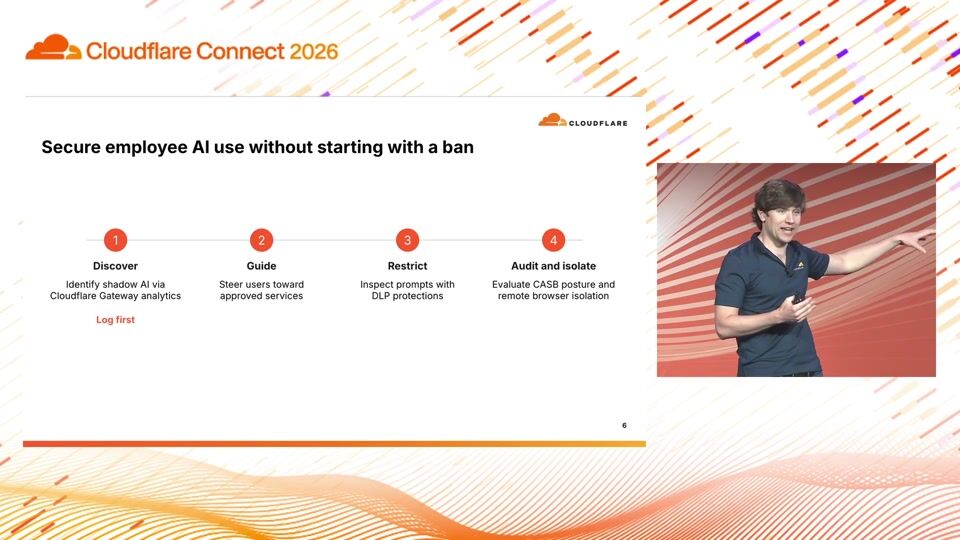
5:43Both are fine. Both are very valid. But what I really encourage folks is getting a way to discover what people are doing and understanding the intent behind their approaches. And then thinking about how do I actually build an approved path for them to go in and use those AI experiences. And whether or not you're using Cloudflare Gateway, which we have. a whole list of shadow AI reports and shadow MCP reports many other secure web gateway providers are doing this as well so as much as I would love all you guys to use that if you're using Zscaler Netscope or other companies like that I would encourage you to look through your network telemetry and start to get an idea of what what types of harnesses people are using what MCPs they're using what different models they're using because that's going to help you lay the framework for how to kind of mix ingredients to create an approved blessed path and then start to first guide users the way we've configured that internally is we use a cloud for one client notification we don't actually block yet but if I go to cloud code on my corporate laptop I get a little pop-up on my device that says hey we detected you're using an unapproved application please refer to our AI usage guide I've seen companies who've taken an even stronger approach you can actually outright block it you can also like force redirect if it's a browser based tool.
7:01So there's a number of things at your disposal if you're proxying and controlling the traffic on the device. The other piece is you can do restrictions, you can do data loss prevention controls, you can look at the nature of the specific prompts and decide whether or not to allow those or not. I've got a demo of that and I'll show you guys what that piece looks like. And then a final piece I'll call out is we do have the ability through our CASB, which is basically at an API. integration into the major model providers we can scan your configuration to look for either security misconfigurations as well as looking for specific sensitive data or misuse by users.
7:45And then the other side is like hey we talked a little bit about this already but for things that are either fully user facing or a web tool that employees are accessing the WAF and security controls that we've got built on on top of those have a lot of just kind of helpful baseline controls. It's running LamaGuard under the hood that allows you to protect against prompt injection, data masking, set content limits, visibility, rate limiting, those types of things.
8:13Thinking about how to take agent identity and connecting it to a model and then connecting up tools, the way that we've done that is we use, we have an AI gateway product that basically consolidates all your models and it's identity aware so you can plug in your identity provider you can use Okta, Intra, Ping, whatever you guys are using and then that allows you to set policies and say x employees can access this particular model, y employees get access to every model that I have available and setting spend limits, controls, all those types of things. Then on the MCP side we have an MCP gateway that we call MCP server portals which allows you to create a consolidated endpoint or multiple if you want. But typically what people will do is create a singular consolidated endpoint for all of your MCP tools and all of your MCP servers, which gives you consolidated logging, DLP controls.
9:06You can route into your private network if you want to put MCPs onto a private host name, as well as set policies on your MCP server. So we'll only show the MCP servers that are scoped to a given user, as opposed to just giving them unfettered access to everything. or relying on the local controls of that SaaS provider, which can vary really, really widely.
9:29So really, the best framework I can talk about is just thinking about how do you observe what people are doing, then start to think about how you're limiting it. How do you then put human checks in place to make sure that really sensitive things are being kicked back to the user and are reviewed? And then we're internally... a lot of luck with doing this in infrastructure as code all of this what i'm talking about is available in our terraform provider which creates a really healthy on -ramp internally where when before that we had teams building their own mcp servers and it was just kind of like everything was a little bit of whack-a-mole and everything was a slightly different tune out of the same songbook uh what implementing this via terraforms allowed us to do is we have a centralized set of code owners who they see when a new pr is raised to add a new MCP server, add a new model.
10:19And that allows the security team to run both a mixture of automated controls as well as do a human review before it's pushed out broadly to the organization, which has worked out really, really well in terms of automating new MCP servers being brought and launched out to the team.
10:38Yeah, and as I said, I'll show you guys here in a moment. I'm going to have you guys cut me over to the demo here in just a second. Um, but we're, we're using this internally. So we, we allow employees to use a number of different AI client clients. I'll show you the list of that in a second. Um, we have common AI gateways. Everybody uses the same AI gateway and it enforces, um, based on identity, the level of budget that you have on a daily basis, as well as which models you can access. Um, we then govern our tools with the MCP portal. Um, and then we get centralized logging around that all tied to your one identity from your identity provider. So if you guys could go ahead and cut me over to my laptop screen here.
11:25Hey, look at that.
11:29So my plan is I'll show you guys some examples of some of the things that we've done internally at CloudFlare as well as I have an example. Basically, I kind of faked a harness in the browser. So the way we think about harnesses and this is a good pattern I would recommend if you guys are going to have some level of agnosticism about what people are going to use, is we just launched a little access-protected web app internally that our DevTools team manages. And then for each of these, we've got set up instructions that basically teach or tell a user how to authenticate to a given harness. So in this, I use Codex, for example. And we just basically created a little package. All it does under the hood is authenticates the user using Cloudflare access as a public host name.
12:15There's a few different ways that you can do that. But that works really nicely because then when I come into, say, Codex, for example, this is actually the Codex session I was using to get ready for this session. And let's tell the crowd you did to configure the demo. And what this is doing in Codex is it's connected to the Cloudflare AI gateway. So I can get, in this case, I'm using GPT Sol. I can connect to Cloud, DeepSeq, the Cloudflare hosted models, any of those things. And this is all going to be centrally logged back in our central logging for Cloudflare. And the other cool thing is that this is hooked into our MCP server portal, so it's got access to all of our internal tools.
13:03And it's using the new Cloudflare. CLI, which if you guys have not tried the Cloudflare CLI out yet, it rocks for agent-driven development. It was able to get access to my personal demo account and just spin everything up without any API keys or anything like that. It's one OAuth kickoff, and then you're able to orchestrate everything out of your application. So while that's running, I can, oh, it's compact in context. So I'll come back to that in a moment. But what that ended up generating is I was able to launch a Cloudflare Connect demo here. And it's got a set of sample prompts that we can go ahead and send through. And I'll show you guys some of the security controls that we're able to put in place. So the first thing is we can look at, hey, I want to send a prompt through the AI gateway.
13:50I'm going to send a normal prompt, and we'll get the waiting for response here. And in this case, we've got like, hey, this was a chat was completed, and it's protecting AI applications. It hit the model, return to . Now I'm going to, I had it construct basically a prompt injection. And I've enabled guardrails on this AI gateway. So this is going to send, under the hood, it's an attempted prompt injection. And then you'll see it's actually returning a 403 back to me in my demo application. So I tried to do something nasty. The guardrails caught it, kicked it back, and just 403'd me.
14:27Going a little bit deeper, we can actually also test something like we configure a dlp policy so we have guardrails which is like i'm trying to do something really bad with the model and llama guard will catch that but there are things that look like they could be legitimate business processes that llama guard would never catch and say like i run a hospital and i never want hipaa data to go into a model i can configure a clops or dlp policy to say block hipaa or block financial information or things like that so then i'm gonna i have one configured that says block test block credit cards, for example. So in this case, I'm going to send data through that had a test. It was just like the Stripe test payment card. And again, we'll see that 403 triggers not just on the LamaGuard check, but also a custom DLP policy that I was able to configure.
15:16Same thing on the triggering and safety guardrail. You can see I'm getting kicked back on that. So that's the AI gateway controls. I'll jump to the Cloudflare dashboard and show you guys what that looks like. So you'll see, let's just do a quick refresh. So I've got the Connect Demo Security AI Gateway that I stood up. And you can see a mix of that first one that I ran, that just basic test prompt, that one succeeded. And then you can see I've got a number of failed prompts as well that failed due to the guardrail track.
15:54and the some of the other really powerful things about the ai gateway is you can start to look at overall spend analysis token usage we have a user insights report that allows you to tie this to specific individual users if you configure your identity provider in front of that that particular endpoint so this does give you a lot of flexibility really all you need to do is you just plug in your provider keys if you use those if you use an api token from the and i get away from directly, or you can do a pass-through where we just basically bill you on behalf and pass it through to the model provider. You can also use Cloudflare hosted models. So we're seeing a lot of benefit from that. We rely really heavily on that internally at Cloudflare. So you can see that my prompt into Codex completed and it said, hey, I used the Cloudflare CLI to build his production account. It configured the model traffic and then AI tools.
16:44And what this looks like from a user. perspective is it's really, really nice to come in. I've got my harness proxy here, and we reveal a number of different models. So as a senior product person, I'm able to get access to most things. I see the menu of models that are available. On the side of, hey, I actually want to curate the experience for folks, I highly recommend you all check out. We have an open source. project that we've released called Cloudflare OS. We use this internally, but we've also deployed an open source version that uses Cloudflare natively. And what this does is this gives you a curated web experience that's integrated with Access.
17:33It uses all the same security controls. But what's really powerful about it is you actually can configure this. We have an auto mode in here. So you can, I don't have it on in my account, but you can set the auto mode to basically pick. the right model for the task that the user's doing, which is great because most people just can pick the most expensive model and move on with their life and always do that. But in reality, most of the time you can get away with a much lighter weight model, especially for folks that aren't trained up on how to get their agent to do the right or correct thing.
18:07The other really powerful thing about this is you can curate and control the skills context that users receive, which again is a big, big benefit. I was talking to some folks who are not as AI experienced yesterday and like kind of blowing their mind in terms of like, hey, here's how you like create an email triage skill or like a humanizer skill to make your writing appear more like your personal style. Those are things that you can just like push out to individual cohorts of users. And then one final piece, we're running a little quick, short on time, though 20 minutes really flies by, is on the MCP. tool side so we have the mcp server portal which allows me to consolidate my mcps the other really powerful piece is we have a thing called code mode which code mode basically allows you to push loads and loads of tools to your your end agent without completely blowing your context window up it instead of revealing all of the tool set when i call this we have basically some like meta tools one is list servers one's toggled servers.
19:11One is search servers, and it prompts the agent to write JavaScript to search the tools, which is a much more token -efficient way to search and find those tools. And then it's able to go fetch the individual tool that it needs to complete the job. And then all of these tool calls within the MCP portal are then centrally logged. So instead of having to go tool by tool, let's see if this one has any logs. of having to go tool by tool, I can see like, hey, the Figma server and the header echo thing that I wrote, they're all in one place as opposed to having to go tool by tool.
19:48So I hope this was a helpful session to see if you guys have a flavor. I'm going to be over in the speaker lounge. But thank you guys so much. We didn't have time for Q&A, but I will hang out if you guys want to come up here, or we can go to the speaker lounge. Thank you guys so much.
Michael Hacker, Michael Kowal
Montclair State University · Cloudflare
Nikita Cano
Cloudflare
Tiago Sada, Bryan Becker
Tools for Humanity, building for World · Cloudflare
Be the first to know when registration opens and the agenda goes live.
---
title: "Secure AI at scale: Cloudflare’s vision for trusted AI adoption"
url: "https://www.cloudflare.com/connect/2026/session/secure-ai-at-scale-cloudflares-vision-for-trusted-ai-adoption"
year: 2026
---

# Secure AI at scale: Cloudflare’s vision for trusted AI adoption

[Watch session](https://www.cloudflare.com/connect/2026/session/secure-ai-at-scale-cloudflares-vision-for-trusted-ai-adoption)

## Session details

- **Track:** Secure AI
- **Topics:** Agentic AI & MCP, Agentic identity, AI security & audit, AI transformation
- **Solution areas:** Application Security, SASE & Workspace Security (Cloudflare One), Developer Platform

## About this session

AI adoption is moving faster than most security models can keep up. In this session, Cloudflare shares its vision for helping organizations use AI without losing control of sensitive data, identities, or applications. See how organizations can secure employee use of AI, protect AI-powered applications, and govern autonomous agents at scale. Leave with a practical framework for reducing risk while giving teams room to experiment, build, and deploy AI with confidence.

## Speakers

- [Kenny Johnson](https://www.cloudflare.com/connect/speakers/2421438) — Principal Product Manager, Cloudflare

## Transcript

[0:03] Thank you everybody for being here, appreciate everybody coming and hanging out. I know everybody's probably pretty eager to get over to the ballpark here in a little bit, so thanks for hanging out with me late on this afternoon. My name is Kenny Johnson. I am a Principal Product Manager at Cloudflare. I oversee our Zero Trust Network Access product, our MCP server portals, as well as I work really closely with our AI Gateway team to add security controls to them. It's really incredible to see everybody here. I've been at Cloudflare six years, and if I think about how far we've come, I'm like blown away that we can fill out Moscone. So thank you guys to all of you who have taken a bet on Cloudflare and have worked with us over the years. So I'm really, really happy to have all of you here. My plan is to talk to you guys through how we're thinking about securing AI at scale.

[0:50] I've got a live demo. I'm going to attempt the demo gods today, and hopefully everything goes well. But before that, I just want to set the scene and kind of run you guys through how we're thinking about doing secure AI adoption internally at Cloudflare, as well as some of the frameworks that we're working with our customers on. So if we think about really the surface that we're trying to cover when we go in and talk to customers and how we're thinking about it internally, there is our workforce's access to AI. So thinking about what are the different models, what are the different harnesses, what are all the different aspects that employees would be interacting with AI. We have AI powered applications, so this could be, I have an agent published on my website and I want that agent to talk to people about car insurance, not solve JavaScript problems and get posted on Twitter, or X, sorry.

[1:37] And then finally, autonomous agents. So these are virtual employees or virtual agents that we have acting in a headless manner. They're not tied to any individual user credential, but we still want to give them access to certain secure systems, emphasis on certain systems, not all. systems. This is where a lot of the challenges that have come in security for years really start to come under pressure. Things like over -provisioned access. Like me, for example, I've been at Cloudflare for six years and my admin token in a lot of our tools does way more than I actually would want my agent to ever do. And I'm a deterministic human being in a high trust part of our organization. My agent, if I'm running it on some low-level agent, I don't necessarily want to trust it. I don't personally trust it.

[2:22] Our security team definitely doesn't trust it. It's the same thing we're also seeing is agents really like to do things like grab API keys. You have people who have never touched an API key in their life. I think we had a good example of an account exec at Cloudflare who had never interacted with a system. They pinged our CIO, Sam, and they were like, hey, my agent says I need a Salesforce production API key to do the thing that I'm trying to do. And the first question was, what are you trying to do? And the answer was no, of course. So really thinking about how do we create shared approved paths for people to get access to what they need outside of being guided by their agents or figuring things out on the fly for themselves. We're also seeing a lot of challenges around split logs. If you're not consolidating things through a gateway or through a centralized path, if you're attempting to use multiple model providers, you're all of a sudden having to.

[3:16] jump from anthropic logs to open AI logs to whatever self-hosted model people are trying to use. So we're really trying to figure out how to stay and remain vendor agnostic. We really want to avoid being locked into any particular model, any particular harness. So that then comes into creating a network layer control, which Cloudflare is just a bunch of proxies all the way down. So we've focused on building a number of different proxies, both at the MCP level, as well as the model level. So the way we think about covering these different services is, first, for employees, we have our Cloudflare one suite of products, which is zero trust network access, a secure web gateway, data loss prevention controls, or remote browser isolation. For customer -facing AI applications, this is more of a traditional Cloudflare application security control.

[4:04] That's what a lot of people come and get started with Cloudflare on. It looks like, hey, I've got something I'm putting out public-facing on the internet. course, want to run the WAF and protect it from known vulnerabilities and things like that. But with AI, it extends a level deeper. So you can use our AI gateway as well as our WAF controls to put specific AI checks in place. So we can look for jailbreak attempts, malicious usage. We're able to detect a number of kind of just bad things that you wouldn't necessarily want a user doing with your application. And then finally, looking at agent identity. So this can both pines. delegated agents off of a user's identity or a fully autonomous agent. Generally, what people are doing is they're using Coffler Access, which supports OAuth, SAML sign-in in front of whatever you're configuring, or you can do a service credential approach.

[4:54] So you can issue service tokens or use certificate-based auth for agents that are gonna be truly autonomous and not acting on behalf of a user. So those are some of the different kind of tools or ingredients that we're mixing together. to secure those different approaches. A big piece that we, or an approach we've taken, an approach I'm seeing a lot of customers take is first you have to get your arms around what the heck people are using. We started in a very, very kind of open, unregulated state, which a lot of tech companies have done. I think companies have gone one of two paths. One is just, hey, I want people to innovate and I'm gonna let my engineers and technical staff do whatever they need to accomplish their job. On the other side, there's companies who are like, no, no, no, we're locking everything down except for one specific AI harness.

[5:43] Both are fine. Both are very valid. But what I really encourage folks is getting a way to discover what people are doing and understanding the intent behind their approaches. And then thinking about how do I actually build an approved path for them to go in and use those AI experiences. And whether or not you're using Cloudflare Gateway, which we have. a whole list of shadow AI reports and shadow MCP reports many other secure web gateway providers are doing this as well so as much as I would love all you guys to use that if you're using Zscaler Netscope or other companies like that I would encourage you to look through your network telemetry and start to get an idea of what what types of harnesses people are using what MCPs they're using what different models they're using because that's going to help you lay the framework for how to kind of mix ingredients to create an approved blessed path and then start to first guide users the way we've configured that internally is we use a cloud for one client notification we don't actually block yet but if I go to cloud code on my corporate laptop I get a little pop-up on my device that says hey we detected you're using an unapproved application please refer to our AI usage guide I've seen companies who've taken an even stronger approach you can actually outright block it you can also like force redirect if it's a browser based tool.

[7:01] So there's a number of things at your disposal if you're proxying and controlling the traffic on the device. The other piece is you can do restrictions, you can do data loss prevention controls, you can look at the nature of the specific prompts and decide whether or not to allow those or not. I've got a demo of that and I'll show you guys what that piece looks like. And then a final piece I'll call out is we do have the ability through our CASB, which is basically at an API. integration into the major model providers we can scan your configuration to look for either security misconfigurations as well as looking for specific sensitive data or misuse by users.

[7:45] And then the other side is like hey we talked a little bit about this already but for things that are either fully user facing or a web tool that employees are accessing the WAF and security controls that we've got built on on top of those have a lot of just kind of helpful baseline controls. It's running LamaGuard under the hood that allows you to protect against prompt injection, data masking, set content limits, visibility, rate limiting, those types of things.

[8:13] Thinking about how to take agent identity and connecting it to a model and then connecting up tools, the way that we've done that is we use, we have an AI gateway product that basically consolidates all your models and it's identity aware so you can plug in your identity provider you can use Okta, Intra, Ping, whatever you guys are using and then that allows you to set policies and say x employees can access this particular model, y employees get access to every model that I have available and setting spend limits, controls, all those types of things. Then on the MCP side we have an MCP gateway that we call MCP server portals which allows you to create a consolidated endpoint or multiple if you want. But typically what people will do is create a singular consolidated endpoint for all of your MCP tools and all of your MCP servers, which gives you consolidated logging, DLP controls.

[9:06] You can route into your private network if you want to put MCPs onto a private host name, as well as set policies on your MCP server. So we'll only show the MCP servers that are scoped to a given user, as opposed to just giving them unfettered access to everything. or relying on the local controls of that SaaS provider, which can vary really, really widely.

[9:29] So really, the best framework I can talk about is just thinking about how do you observe what people are doing, then start to think about how you're limiting it. How do you then put human checks in place to make sure that really sensitive things are being kicked back to the user and are reviewed? And then we're internally... a lot of luck with doing this in infrastructure as code all of this what i'm talking about is available in our terraform provider which creates a really healthy on -ramp internally where when before that we had teams building their own mcp servers and it was just kind of like everything was a little bit of whack-a-mole and everything was a slightly different tune out of the same songbook uh what implementing this via terraforms allowed us to do is we have a centralized set of code owners who they see when a new pr is raised to add a new MCP server, add a new model.

[10:19] And that allows the security team to run both a mixture of automated controls as well as do a human review before it's pushed out broadly to the organization, which has worked out really, really well in terms of automating new MCP servers being brought and launched out to the team.

[10:38] Yeah, and as I said, I'll show you guys here in a moment. I'm going to have you guys cut me over to the demo here in just a second. Um, but we're, we're using this internally. So we, we allow employees to use a number of different AI client clients. I'll show you the list of that in a second. Um, we have common AI gateways. Everybody uses the same AI gateway and it enforces, um, based on identity, the level of budget that you have on a daily basis, as well as which models you can access. Um, we then govern our tools with the MCP portal. Um, and then we get centralized logging around that all tied to your one identity from your identity provider. So if you guys could go ahead and cut me over to my laptop screen here.

[11:25] Hey, look at that.

[11:29] So my plan is I'll show you guys some examples of some of the things that we've done internally at CloudFlare as well as I have an example. Basically, I kind of faked a harness in the browser. So the way we think about harnesses and this is a good pattern I would recommend if you guys are going to have some level of agnosticism about what people are going to use, is we just launched a little access-protected web app internally that our DevTools team manages. And then for each of these, we've got set up instructions that basically teach or tell a user how to authenticate to a given harness. So in this, I use Codex, for example. And we just basically created a little package. All it does under the hood is authenticates the user using Cloudflare access as a public host name.

[12:15] There's a few different ways that you can do that. But that works really nicely because then when I come into, say, Codex, for example, this is actually the Codex session I was using to get ready for this session. And let's tell the crowd you did to configure the demo. And what this is doing in Codex is it's connected to the Cloudflare AI gateway. So I can get, in this case, I'm using GPT Sol. I can connect to Cloud, DeepSeq, the Cloudflare hosted models, any of those things. And this is all going to be centrally logged back in our central logging for Cloudflare. And the other cool thing is that this is hooked into our MCP server portal, so it's got access to all of our internal tools.

[13:03] And it's using the new Cloudflare. CLI, which if you guys have not tried the Cloudflare CLI out yet, it rocks for agent-driven development. It was able to get access to my personal demo account and just spin everything up without any API keys or anything like that. It's one OAuth kickoff, and then you're able to orchestrate everything out of your application. So while that's running, I can, oh, it's compact in context. So I'll come back to that in a moment. But what that ended up generating is I was able to launch a Cloudflare Connect demo here. And it's got a set of sample prompts that we can go ahead and send through. And I'll show you guys some of the security controls that we're able to put in place. So the first thing is we can look at, hey, I want to send a prompt through the AI gateway.

[13:50] I'm going to send a normal prompt, and we'll get the waiting for response here. And in this case, we've got like, hey, this was a chat was completed, and it's protecting AI applications. It hit the model, return to . Now I'm going to, I had it construct basically a prompt injection. And I've enabled guardrails on this AI gateway. So this is going to send, under the hood, it's an attempted prompt injection. And then you'll see it's actually returning a 403 back to me in my demo application. So I tried to do something nasty. The guardrails caught it, kicked it back, and just 403'd me.

[14:27] Going a little bit deeper, we can actually also test something like we configure a dlp policy so we have guardrails which is like i'm trying to do something really bad with the model and llama guard will catch that but there are things that look like they could be legitimate business processes that llama guard would never catch and say like i run a hospital and i never want hipaa data to go into a model i can configure a clops or dlp policy to say block hipaa or block financial information or things like that so then i'm gonna i have one configured that says block test block credit cards, for example. So in this case, I'm going to send data through that had a test. It was just like the Stripe test payment card. And again, we'll see that 403 triggers not just on the LamaGuard check, but also a custom DLP policy that I was able to configure.

[15:16] Same thing on the triggering and safety guardrail. You can see I'm getting kicked back on that. So that's the AI gateway controls. I'll jump to the Cloudflare dashboard and show you guys what that looks like. So you'll see, let's just do a quick refresh. So I've got the Connect Demo Security AI Gateway that I stood up. And you can see a mix of that first one that I ran, that just basic test prompt, that one succeeded. And then you can see I've got a number of failed prompts as well that failed due to the guardrail track.

[15:54] and the some of the other really powerful things about the ai gateway is you can start to look at overall spend analysis token usage we have a user insights report that allows you to tie this to specific individual users if you configure your identity provider in front of that that particular endpoint so this does give you a lot of flexibility really all you need to do is you just plug in your provider keys if you use those if you use an api token from the and i get away from directly, or you can do a pass-through where we just basically bill you on behalf and pass it through to the model provider. You can also use Cloudflare hosted models. So we're seeing a lot of benefit from that. We rely really heavily on that internally at Cloudflare. So you can see that my prompt into Codex completed and it said, hey, I used the Cloudflare CLI to build his production account. It configured the model traffic and then AI tools.

[16:44] And what this looks like from a user. perspective is it's really, really nice to come in. I've got my harness proxy here, and we reveal a number of different models. So as a senior product person, I'm able to get access to most things. I see the menu of models that are available. On the side of, hey, I actually want to curate the experience for folks, I highly recommend you all check out. We have an open source. project that we've released called Cloudflare OS. We use this internally, but we've also deployed an open source version that uses Cloudflare natively. And what this does is this gives you a curated web experience that's integrated with Access.

[17:33] It uses all the same security controls. But what's really powerful about it is you actually can configure this. We have an auto mode in here. So you can, I don't have it on in my account, but you can set the auto mode to basically pick. the right model for the task that the user's doing, which is great because most people just can pick the most expensive model and move on with their life and always do that. But in reality, most of the time you can get away with a much lighter weight model, especially for folks that aren't trained up on how to get their agent to do the right or correct thing.

[18:07] The other really powerful thing about this is you can curate and control the skills context that users receive, which again is a big, big benefit. I was talking to some folks who are not as AI experienced yesterday and like kind of blowing their mind in terms of like, hey, here's how you like create an email triage skill or like a humanizer skill to make your writing appear more like your personal style. Those are things that you can just like push out to individual cohorts of users. And then one final piece, we're running a little quick, short on time, though 20 minutes really flies by, is on the MCP. tool side so we have the mcp server portal which allows me to consolidate my mcps the other really powerful piece is we have a thing called code mode which code mode basically allows you to push loads and loads of tools to your your end agent without completely blowing your context window up it instead of revealing all of the tool set when i call this we have basically some like meta tools one is list servers one's toggled servers.

[19:11] One is search servers, and it prompts the agent to write JavaScript to search the tools, which is a much more token -efficient way to search and find those tools. And then it's able to go fetch the individual tool that it needs to complete the job. And then all of these tool calls within the MCP portal are then centrally logged. So instead of having to go tool by tool, let's see if this one has any logs. of having to go tool by tool, I can see like, hey, the Figma server and the header echo thing that I wrote, they're all in one place as opposed to having to go tool by tool.

[19:48] So I hope this was a helpful session to see if you guys have a flavor. I'm going to be over in the speaker lounge. But thank you guys so much. We didn't have time for Q&A, but I will hang out if you guys want to come up here, or we can go to the speaker lounge. Thank you guys so much.

## Related sessions

- [Don't block shadow AI on campus. Out-design it.](https://www.cloudflare.com/connect/2026/session/dont-block-shadow-ai-on-campus-out-design-it)
- [The agentic network: Secure private connectivity for agents](https://www.cloudflare.com/connect/2026/session/the-agentic-network-secure-private-connectivity-for-agents)
- [After human: How to think about fraud & abuse when anyone could be anything](https://www.cloudflare.com/connect/2026/session/after-human-how-to-think-about-fraud-and-abuse-when-anyone-could-be-anything)

## More from Connect

- [All sessions](https://www.cloudflare.com/connect/)
- [Get notified for Connect 2027](https://www.cloudflare.com/connect#2027)


